

Description




Price: $499.99 – $447.96
Details)
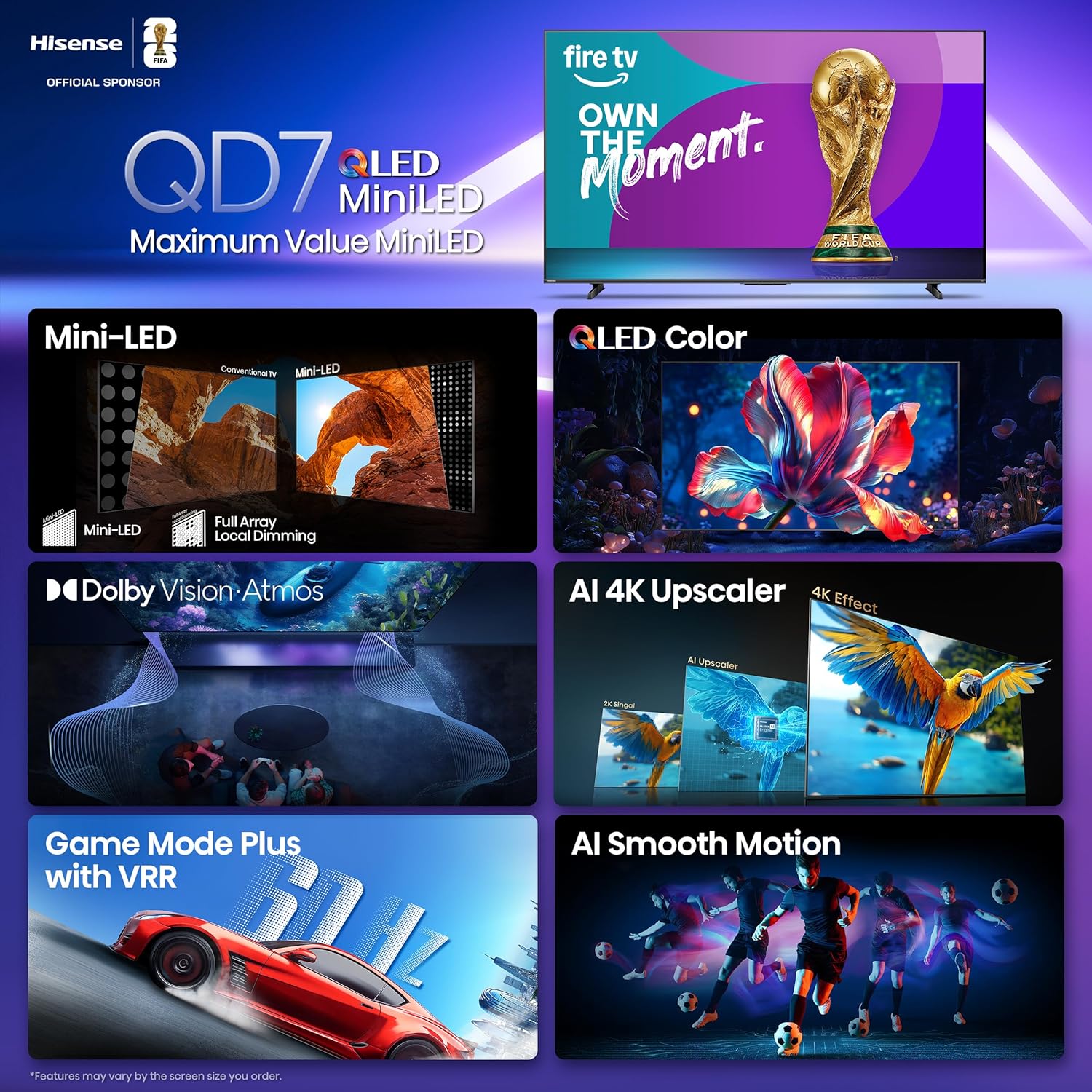
The Hisense QD7 Series changes the TV game. It’s a solid introduction to realistic Mini-LED contrasts and QLED Color with over one billion shades. Dolby Vision HDR and Dolby Atmos put you in the stands, so you can see every blade of grass, hear every call of the ref and cheer of the fans. And advance your gameplay with Game Mode Plus and 144Hz Game Mode Pro* by virtually eliminating screen tearing
MINILED | UP TO 600 NITS PEAK BRIGHTNESS: See more contrast on the field and off. Lots of tiny LEDs make a major difference when it comes to the realism of your picture. Think of them like pinpoints of light illuminating your screen. And Full Array Local Dimming creates deeper shadows and brighter highlights, while virtually eliminating halos
QLED COLOR: See the exact hue of every blade of grass on the field and every line on the court. QLED Color is made up of quantum dots—very small particles with the ability to display over a billion shades of color. This feature renders every frame with rich, vibrant and realistic color, ensuring that even the most minute details stand out
PRESS & ASK | ALEXA: Just press and ask Alexa to find, launch, and control your content. Go beyond streaming to check sports scores, set timers, reminders, and more
FIRE TV: Get right to the good stuff. Fire TV puts your favorite apps front and center on one main home screen. So you can quickly find shows, movies, and live TV you love without the endless scrolling
DOLBY VISION AND DOLBY ATMOS: The fusion of Dolby Vision HDR imaging and Dolby Atmos sound transforms your TV into an entertainment powerhouse. These image and sound technologies from the cinema, now brought together for the home, provide amazing realism that you’ll see, hear, and feel like never before
AI 4K Upscaler: Stream your favorite live sports with striking clarity. AI 4K Upscaler uses machine learning models to enhance low-resolution content to near 4K quality. Watch beloved movies, home videos and TV broadcasts with sharper edges, more detailed textures and improved visual quality.
AI Smooth Motion with MEMC: See all the action clearly, including super-fast breakaways and three-point plays. The AI Smooth Motion is powered by advanced features like MEMC, AI Noise Reduction and a built-in highly responsive panel to create an ultra-crisp, blur-free picture—no matter the speed of movement on the screen.
Filmmaker Mode: Watch classic shows and movies just as the filmmaker intended. Filmmaker Mode shows you the picture as it was originally envisioned, before it was adapted for every audience. This feature automatically adjusts your settings, so you can experience the original aspect ratio, frame rate, color and audio.
Game Mode Plus with VRR & Motion Rate 240: Get ready to game on! Game Mode Plus with Variable Refresh Rate and Auto Low Latency Mode make for a smooth, lag-free playing experience. Eliminate screen tearing and reduce input lag, while showing your opponent who’s boss.
Seamless Connectivity: Transform your viewing experience with effortless connectivity. The TV supports Apple AirPlay 2 for smooth streaming, integrate with Apple Homekit for smart control, and features 4 ports of HDMI 2.1 for superior video quality. Plus, enjoy Bluetooth for wireless convenience and USB ports for easy device access.
Reviewer: GP!
Rating: 5.0 out of 5 stars
Title: Best RGB color for Budget Mini-LED
Review: Bought the budget TCL mini-led QM5K 50 inch and everything about it was perfect (Google TV) but the color was a little off and not sure if that is a one-off issue, or if all 5K’s are like that. Very impressive with vibrant colors and smooth clear images, but it didn’t have a wide range in the yellow and orange colors. It was a little limited even after trying all sorts of color calibrations and adjustments. Bought this TV and it does have smooth play issues (stuttering) at the beginning of Prime Video. After about a minute, it is okay. Tried both Ethernet and WIFI and it didn’t matter. Haven’t tried my fire or Roku stick yet, but I might. If this Hisense had Google TV, I would have bought two, no question. I don’t like Fire much. As for the color, I use the “Custom” setting for Picture Mode and the color is EXACTLY the way I like it. It’s so good, I didn’t even check the other settings. I use the same exact numbers for HLG, HDR10, and “standard video (like youtube) and live TV”. Having “Skin Tone Control” really helps add more color without over-saturation. I didn’t see that on my TCL. Not sure if the AI chip learns the signal format, but it does seem to improve the more I use it. Not a lot, but it does seem smoother and clearer now than out of the box. Another win for this TV over the 5K is I have it hooked up to a Vizio sound bar. On this TV, when you adjust the volume, it gives a number value (10,12,14) but the TCL just shows + or -. I like to see the number volume value. Since Fire isn’t intuitive for setting, you have to disconnect the eARC HDMI cable, THEN adjust your bass/treble, then plug it back in. (huh?) to add depth to the sound bar. Hisense does need to tweak this model a little bit, and if they do, it will be very much a value win as a mini-led at this price point and is very much worth it. I almost went with a QLED, but glad I spent the extra $100 or so for mini-led.
Reviewer: Steven W. McNamara
Rating: 5.0 out of 5 stars
Title: A great investment for a big screen smart TV.
Review: Very nice smart big screen television. Very big & very heavy. Purchasing this I strongly advise you understand something this big is also very heavy and it absolutely needs 2 people to work with it. GREAT technology and the whole unit itself is very sturdy. The television pictures are amazing, and the sound is fantastic. It’s a huge investment and if cinema viewing is your passion, then this big screen smart TV is perfect for you. Definitely not for a small room. The backside of the unit has 2 handles built in to help hold the tv & lift or walk with it. The volume is wonderful!
Reviewer: Benny Harris
Rating: 1.0 out of 5 stars
Title: Final review of Hisense 65QD7QF, 2025 Model and problems with replacement of defective remote.
Review: I will update this review after a month’s experience with the TV if this website allows editing of a review, but so far this is a cautionary tale. I got the TV registered to my Amazon account through an ethernet connection despite the remote’s navigation wheel sticking or not responding at times, but wrote that off to my going too fast, so I slowed down my input on the wheel and finally was able to complete the internet login and various app selections. That process took me roughly 40 minutes due to the navigation wheel sticking at times.I think one of my mistakes was not immediately going to the settings selection and downloading any updates (firmware or software) right then. I had assumed that once I registered my account that whatever my Amazon account was sending the TV (the screen showed an updating message for a minute or two) that information also included firmware/software updates. I assumed, but don’t actually know, so should have checked out the setting menu immediately.But the TV worked and I wanted to check out the picture quality and sound. Had already signed up for Prime video so began watching an episode of the TV series “Bones.” It looked great and sound quality was excellent. (Hadn’t done any messing around with exploring the TV’s setting yet). Decided to check over the air broadcast through my antenna. Had the TV do a channel scan and it picked up all stations and channels (29 in all same as with my ancient “stupid” TV, so all well and good). Clicked randomly on one of the local over the air stations. Was playing a foot ball game which looked great, motion display great, sound great – again without messing around with TV settings. Was going to select another station when problems began again with the selector ring on the remote, but it was late and I needed to go to bed so turned off the TV, using the remote (which was working with all input buttons responding *except* the direction movement controls on the navigation ring) and then unplugged the TV from the wall outlet.Next day plugged in TV, turned on using remote and everything was looking and sounding great for about one minute, then the navigation ring decided to quit again. Took out remote’s batteries, waited a few minutes then reinstalled batteries, paired remote again – navigation ring still didn’t work. Took out batteries waited 15 minutes while consulting Amazon and Hisense recommended procedures, installed freshly purchased Duracell brand AAA batteries, paired remote again – navigation ring still didn’t work.This was on December 3rd of this year. From then on, every day until the I ran through every procedure listed on both the Hisense documentation and Amazon support for trouble shooting both the TV and remote. Ran through each procedure for both the TV and remote starting at around ten in the morning until around 8 or nine o’clock until the 7th of December (I’m an old, retired widower so I had the time). No luck with the navigation ring on the remote.From December 8th up till around 12th I began sending messages to Amazon support and then calling directly, but could only get an “ai clanker” to respond on the phone which only ran through already taken steps which hadn’t worked. Began to suspect issue was with navigation ring directional presses failing to register on sensors inside the remote.Decided to buy one of the many replacement remotes Amazon sells. * WarningI * for my model I was eventually told on the phone by a human support person at Amazon – who I eventually reached on the 12th – that this particular model – unlike all other Hisense models sold by Amazon – was “specifically excluded from compatibility by Amazon policy with any Amazon Fire TV remote or Firestick unit, and that all the third party remote replacements sold by Amazon would only work with Hisense models using the Google operating system, not Fire TV operating system.” Those were the support person’s words.The support person said he’d consult with their “technical department” about it and asked permission to put me on hold while he consulted them. I said “yes”, waited about four minutes. The support person came back to the phone told me the technical department didn’t explain “why” the exclusion, but it was policy and there were *** “No third party replacement remotes sold on the Amazon website that would work with this Hisense model sold by Amazon!” *** He then told me there was no more support Amazon could give me on the matter and I should exclusively go to Hisense to see about a replacement remote.More problems began, but now with Hisense support but may be getting resolved in a few days (It took two days for Hisense to finally tell me that a company called “Encompass Supply Chain Solutions, Inc.” actually did the selling of Hisense TV to the retailers for them and handled all service and remote replacement issues. Hisense support initially had just kept going through the same reset of TV and remote, including battery changes, that Amazon had. Somehow they finally understood it was possibly a hardware issue and told me about the “Encompass” outfit.By the way, I registered this model Hisense on the Hisense website on December 4th and got a nice reply email thanking me for registering. But the next day, when I went back to the Hisense website to look around at their support site, the site asked me to enter my TV model nuber. i entered “65QD7QF” (without quotation marks) and got the message ‘model number not found”. I’ve gotten the same message every time i visit the Hisense site since!On the 12th I went to the “Encompass” website, correctly entered the model number of my TV, and got the message “model not found” as well. Whoah! Fortunately, they were responsive and I’ve been corresponding with an actually person who’s looking into why this happened and getting me a replacement remote. I expect to hear back soon (they’ve been quick to respond so far). Unfortunately, his latest message said they needed to get some “technical information” (whatever that might be) from Hisense to hopefully resolve various technical and other (unspecified) issues and get me a remote.It occurred to me just now that perhaps the navigation unit on this particular remote needs even more precise selection precision than my fingertips or even fingernails can provide? Perhaps, but I play classical guitar, the Recorder and piano so I don’t know. Since I have a stylus that came with my new phone, I’m going to turn on the TV one last time tomorrow and see if the stylus works to get the navigation ring on the remote to operate.Of course if there’s some weird reason replacement of the remote can’t be done – and if I can’t buy a brace of remotes as backups or identification of third party remotes from other suppliers can’t be done, I’ll tell Amazon to come pick the TV up and refund the money. Am hoping to hear by Christmas, but if the answer is negative or not answered by the middle of January, I still have until January 31st, 2026 to tell Amazon to come pick it up and refund me. (I’ll do it no later than the 16th!)The tale is told. Again this is my preliminary review and really Iiked the TV’s performance (sight and sound) in the short time I had had it running.I suspect that a version of this TV with an operating system other than Amazon Fire TV would be a better choice as there are a number of third party remotes that work with other operating system versions, especially the versions with Google operating system. The other versions of this Hisense model come with both bluetooth and infrared communication on those remotes. The Amazon Fire TV model only has bluetooth. I had no problems with pairing the remote I have, the problems were solely with the navigation device on the remote.Would like to keep it, but it’s up to their 3rd party replacement parts company now.— [First update]I tried the ‘using a stylus’ on the navigation ring experiment, but it didn’t work.It has been four days since the Encompass support told me they needed to get “technical information” from Hisense. I haven’t heard back yet as the weekend begins. I’m thinking that if I don’t hear back by the morning of Christmas eve, I’m going to give up and tell Amazon to come get this and refund my money.I am aggravated that Amazon for the last two days has been sending me e-mails asking me to take a look at various third party remotes. Well, I do go take a look anyway and find they’re all for Google operating system,Roku and none of them support the Fire Operating system on this TV!Hisense is facing three class action lawsuits file recently in the states of New York, Illinois and California over this particular Hisense model. They may be thrown out of court, though. I won’t wait to see the outcome.Final Judgement: I returned the Hisense TV to Amazon for a refund. for the following reason:The (fomerly third party Hisense support company) “Encompass” is now owned by Hisense USA’s parent holding company. Encompass now tells me they have no idea if or when Hisense’s manufacturing facility in China will make a replacement remote or even an estimate as to when it might happen.


